Showing posts with label AX 2009. Show all posts

Friday, June 8, 2018

Generating Random Numbers and Dates (AX 2012)

The Random class creates random integer values.  Although the range of an int (32 bit) is: [-2,147,483,647 : 2,147,483,647], Random.nextInt() generates values from 0 to 32,767, which is an unsigned 16-bit integer.  Let's run the Random class to validate the randomness.

The results of generating 1,048,574 random numbers represented as a histogram:


The RandomGenerate class enables you to specify a range for the random numbers.  Let's test RandomGenerate.randomInt() method.

Results of generating 1,048,574 random numbers between 0 and 3,000 represented as a histogram:
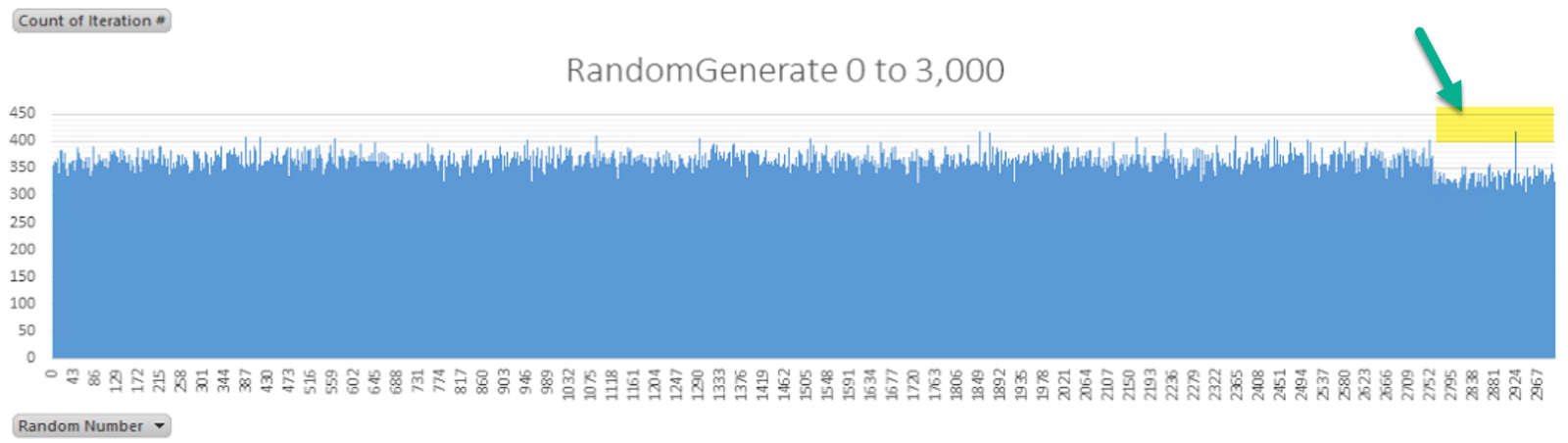

There is an interesting drop off close to the 3,000 mark.

Generating a random date

dateNull() is 1/1/1900 or 0 as an integer
dateMax() is 12/31/2154 or 93136 as an integer

12/30/2154 is 93135 as an integer, so dates are stored as the number of days since January first of 1900.  So we can generate a random date by generating numbers between 0 and 93,136.

Results of generating 1,048,574 random numbers between 0 and 3,000 represented as a histogram:


There isn't an obvious issue. :)  I checked and as far as I could tell it did not generate the same numbers over and over, and it can accept a seed:

  randomGenerate = RandomGenerate::construct();
  randomGenerate.parmSeed(new Random().nextInt());

Keep in mind that the compiler needs to you first assign the output of the function to an integer before casting it to a date:

  myInt = randomGen.randomInt(0, 93136);
  myDate = dateNull() + myInt;  // Convert to date

As long as you are not generating random numbers for cryptography, this implementation should satisfy the requirement.  As an alternative, call to the .NET class System.Random or another library.

Wednesday, May 10, 2017

Finding invalid document handling references

static void listDocuHandling_InvalidPaths(Args _args)
{
    DocuRef                 docuRef;
    DocuValue               docuValue;
    SysOperationProgress    progress;
    Common                  common;
    ;
    setPrefix("Invalid document handling file references");

    // Initialize progress indicator
    select count(RecId) from docuRef;
    progress = new SysOperationProgress(1, true);
    progress.setTotal(docuRef.RecId);
    progress.setCaption(funcname());

    while select docuRef
    join docuValue
    where docuValue.RecId == docuRef.ValueRecId
    {
        progress.setText(docuRef.Name);
        common = docuRef.refCommon();
        setPrefix((docuRef.Name) ? int642str(docuRef.RecId) + ' - ' + docuRef.Name : int642str(docuRef.RecId));

        if (!common.RecId)
        {
            error(strfmt("Referenced record %1 in %2 does not exist", docuRef.RefRecId, docuRef.refTablename()));
        }

        // Check if the file exists
        if (docuRef.docuType().FilePlace != DocuFilePlace::Database
         && !WinAPI::fileExists(docuValue.Path + docuValue.fileName()))
        {
            info(docuValue.Path + docuValue.fileName());
            if (common.RecId)
                info(common.caption(), strMin(), SysInfoAction_TableField::newBuffer(common));
        }
        progress.incCount();
    }
    progress.kill();
}

Saturday, February 18, 2017

List AOSs Supported by SQL Server Instance

I recently found myself in the situation of needing to know what Dynamics AX Application Object Servers (AOS) are online in an environment.  The situation was a bit simplified because all of the AOS were served by the same SQL Server.  So I set out to build a SQL script which would query all of the relevant AX databases, look at the online servers and clients then summarize what it found.  After some tinkering I was able to create the following result:


Here is the query should you want to use it!

Saturday, January 28, 2017

Optimizing installing ISV solutions in AX 2012 (Compare Tool)

When integrating a comprehensive ISV solution into your AX environment there is always the possibility that there is a conflict: perhaps the ISV solution was built for a different version of AX, or you already have several other solutions installed.  This means spending significant hours comparing objects, almost to the point that you could have coded the ISV solution yourself, LOL!

How can we make this process faster?  How can we optimize it?

Right click > Compare, click compare button, expand, expand...expand, expand, click, review, scroll...repeat 100 times.

Modifications to AX Compare Tool-
The first thing I noticed is that when I hit compare, the screen is so tiny that I'm constantly resizing it.
Modify the following to support the resolution you are using:  \Forms\SysCompareForm.init()
For my 4k monitor I found that using 600 by 900 enabled me to see as much code as possible.  So I added:

html.prefColumnSize(600, 900);
Tree.prefColumnSize(300, 900); // wider by 100px

You can also modify which two layers it immediately chooses.  In the past I have changed it so that the washed "layer" was never selected.

Also you could consider running the comparison in CIL.  It sounds great, however read it carefully because the generated code may not be what you expect.

The compare tool as it comes with AX already sets focus on the Compare button, so hitting enter will cause it to start the compare.  However you could modify the form to automatically hit the compare button after a second, saving you a few milliseconds.

What other hacks/tricks have you done to speed up this process?  Let me know in the comments.

Tuesday, November 30, 2010

Change default layers when comparing code

During the integration of system patches or third-party layers I found it annoying to continually select a certain layer when using the compare tool.  Multiply the time it takes by 400 or more nodes and you get an unhappy developer.
Fixing this problem is very easy.  Just add the following code to the end of the \Classes\SysCompare.initContext() method.


    if (comboBox1.getText(comboBox1.selection()) == comboBox2.getText(comboBox2.selection()) && comboBox2.items() > comboBox2.selection() + 1 )
    {
        comboBox2.selection(comboBox2.selection()+1);

        // 2010.11.30  Change default selectons for code comparison
        if (comboBox1.items() == comboBox2.items() - 1)
        {
            if (comboBox1.items() > 2 && Global::strEndsWith(comboBox2.getText(comboBox2.items() - 1), ' (Washed)')) // english only
            {
                // Compare last two layers (not selecting the washed version)
                comboBox1.selection(comboBox1.items() - 2); // Set first drop down to second-to-last possible option
                comboBox2.selection(comboBox2.items() - 2); // Set second drop down to second-to-last possible option
            }
        }
    }
    // 2010.11.30  Change default selections for code comparison when importing
    else if (comboBox1.items() > 1 && comboBox2.items() == 1 && Global::strEndsWith(comboBox2.getText(1 - 1), ' (xpo)'))
    {
        // Compare last layer to the imported XPO
        comboBox1.selection(comboBox1.items() - 1); // Set first drop down to last possible option
    }

Monday, November 1, 2010

Disable users who are not active in Active Directory

Occasionally when auditors come by I like to disable all user accounts in AX which have been disabled in Active Directory.  Even though AD will not let them login auditors have a hard time understanding it, so I disable the users.  Many times we do not get notification that someone has left the company, or sometimes it does not reach the right people in charge of AX security.  So I made the job below which disables users in AX because they are disabled in Active Directory.  The job takes a little while to run.


static void disableUsersMissingInAD(Args _args)
{
    UserInfo                userInfoUpdate;
    xAxaptaUserManager      xAxaptaUserManager;
    xAxaptaUserDetails      xAxaptaUserDetails;
    #Guest
    
    xAxaptaUserManager = new xAxaptaUserManager();

    Global::startLengthyOperation();
    ttsbegin;

    while select forUpdate userInfoUpdate
    order by networkAlias
    where userInfoUpdate.Id != #GuestUser
       && userInfoUpdate.enable == 1
    {
        // Get the single user's details from the kernel class
        xAxaptaUserDetails = xAxaptaUserManager.getDomainUser(userInfoUpdate.NetworkDomain, userInfoUpdate.NetworkAlias);

        // Only show users who are enabled in Active Directory
        if (xAxaptaUserDetails == null || xAxaptaUserDetails.getUserCount() == 0 || !xAxaptaUserDetails.isUserEnabled(0))
        {
            userInfoUpdate.enable = 0;
            userInfoUpdate.update();
        }
    }

    ttscommit;
    Global::endLengthyOperation();
}

Saturday, July 17, 2010

Inventory Closing and Adjustment

After writing a report which shows inventory transaction cost as of a specific date we had a small issue where very occasionally certain transactions were showing double cost.  After some poking around I found this post:

http://fedotenko.info/?page_id=31

The developer goes into depth about the procedure conceptually, technically, and differences between AX 4.0 and 2009 costing.  It is the very best explanation of the inventory costing feature in AX and saves many many hours of reading and interpreting code to understand.