Sunday, January 21, 2018

Search the Internet for Bible References on a Topic

Scraping a Web Site for Bible References

Using the function from the prior post, we can leverage PowerShell to download a web page and parse it for us to find references to scripture.

$requestResult = Invoke-WebRequest -Uri "https://blogs.lcms.org/2018/loving-your-internet-neighbor" -DisableKeepAlive -UseBasicParsing -ErrorAction SilentlyContinue

if ($requestResult.StatusCode -eq 200)
{
    Get-BibleReferences $requestResult.Content | Format-Table -AutoSize
}


Output
Reference    Book    Chapter Verses From To
---------    ----    ------- ------ ---- --
1 Cor. 1:23  1 Cor   1       23     23     
1 PETER 3:15 1 PETER 3       15     15     
John+5:39    John    5       39     39     
John 5:39    John    5       39     39     
Luke 24:27   Luke    24      27     27      


Search the Internet for Bible References on a Topic

So let's take this a bit farther.  Let's say someone sends you an email wanting to know more about the Biblical position on, let's say, heaven and hell.  So you could fire up Google and spend the next half hour looking at the first ten posts on heaven and hell.  But really, we should take what scripture says first, then consider the opinions of others.  This lead me to wanting to look at only the Bible verses relating to Heaven or Hell.

I have built a function which will query Google, read the first page of results then download each of the results, scrape them for Bible references, and return not only the reference but also the Bible text in NET Bible format.  Although it takes about a minute to run it saves a bunch of time!

Get-BibleReferencesOnTopic "Lutheran Heaven Hell" | Select-Object Reference, Text | Export-Csv -Path "References.csv" -NoTypeInformation


Sample output (400 Bible References):


The code is available on Github!

Find Bible Verses using PowerShell

Using regular expressions and PowerShell we can create some code which will parse a Bible verse and then these values can be used in other ways.  In the function below I've used the .NET RegEx class to read Bible verses, which can be read from a text/CSV file into a variable.  It will find Bible verses within other text too.

function Get-BibleReferences {
    <#
        .SYNOPSIS
            Finds scripture references within the provided text.

        .DESCRIPTION
            Uses regular expressions to find references to the Bible and returns them as a set.

        .PARAMETER Text
            The text to parse for scripture references.

        .EXAMPLE
            PS C:\> Get-BibleReferences "Titus 3:1  Really any text can be here -- 1 Timothy 2:1-2 -" | Format-Table -AutoSize

            Reference       Book      Chapter Verses From To
            ---------       ----      ------- ------ ---- --
            Titus 3:1       Titus     3       1      1     
            1 Timothy 2:1-2 1 Timothy 2       1-2    1    2

        .NOTES
            Dag Calafell
            01.20.2018

        .LINK
            https://dynamicsax365trix.blogspot.com/
    #>
    [CmdletBinding(DefaultParameterSetName="Default")]
    param(
        [Parameter(ParameterSetName="Default",
            ValueFromPipelineByPropertyName=$true,
            Mandatory=$true,
            Position=0)]
        [ValidateNotNullOrEmpty()]
        [string[]]$text
    )

    $regex = new-object System.Text.RegularExpressions.Regex("(?(?:(?:[123]|I{1,3})\s*)?(?:[A-Z][a-zA-Z]+|Song of Songs|Song of Solomon)).?\s*(?1?[0-9]?[0-9]):\s*(?\d{1,3})(?:[,-]\s*(?\d{1,3}))*", [System.Text.RegularExpressions.RegexOptions]::MultiLine)
    $regexMatches = $regex.Matches($text)

    foreach ($match in $regexMatches)
    {
        $groups = $match.Groups
        $book         = $groups[1].Value
        $chapter      = $groups[2].Value
        $fromVerseNum = $groups[3].Value
        $toVerseNum   = $groups[4].Value

        $object = New-Object –TypeName PSObject
        $object | Add-Member –MemberType NoteProperty –Name Reference –Value $groups[0].Value
        $object | Add-Member –MemberType NoteProperty –Name Book –Value $book
        $object | Add-Member –MemberType NoteProperty –Name Chapter –Value $chapter

        if ($groups[4].Success)
        {
            $object | Add-Member –MemberType NoteProperty –Name Verses –Value ("{0}-{1}" -f $fromVerseNum, $toVerseNum)
            $object | Add-Member –MemberType NoteProperty –Name From –Value $fromVerseNum
            $object | Add-Member –MemberType NoteProperty –Name To –Value $toVerseNum
        }
        else
        {
            $object | Add-Member –MemberType NoteProperty –Name Verses –Value $fromVerseNum
            $object | Add-Member –MemberType NoteProperty –Name From –Value $fromVerseNum
            $object | Add-Member –MemberType NoteProperty –Name To –Value ""
        }

        # Return the info
        $object
    }
}

# Example
Get-BibleReferences "Titus 3:1  Really any text can be here -- 1 Timothy 2:1-2 -" | Format-Table -AutoSize

Output
Reference       Book      Chapter Verses From To
---------       ----      ------- ------ ---- --
Titus 3:1       Titus     3       1      1      
1 Timothy 2:1-2 1 Timothy 2       1-2    1    2 

This code is part of a larger script I'm working on to take a file of scripture references and return the full text to aid me in developing Bible studies.

Credit goes to RegexLib for the starting regex that I modified capture the data into groups.  Many times it is easier to find something to start with and extend it to what is desired.

Saturday, January 6, 2018

Allow WEMO Communication through your Firewall

The following instructions will enable your WEMO devices to communicate through your firewall without Upnp enabled.  Disabling Upnp is a best practice because otherwise any device inside your network would be able to open up any port to the outside world.  The screen shots will be from a pfSense 2.4 firewall but would apply to other firewalls as well.

There are two things your WEMO devices will require:

1. Ability to ping your gateway device (ICMP traffic)
2. Allow these Inbound and outbound TCP and UDP ports:
    - TCP 8080
    - TCP 8443
    - TCP/UDP 3475-3478
    - TCP/UDP 5223-5228
    - TCP/UDP 8445-8663

0. Preparatory work

To simplify the following steps, we are going to assign static IP addresses to our WEMO devices then create two firewall aliases.  A firewall alias is just a list of ports or IP addresses that can be referenced without typing them in over and over again.

Assign Static IPs for WEMO Devices

You'll need to log into your DHCP server, i.e. wireless router or firewall, to assign those devices static IP addresses.  Go ahead and write them down for future reference.

Firewall aliases:


  • WEMO_Devices - for this alias put in the static IP address for all of your WEMO devices.  A screen shot not provided for obvious reasons.
  • WEMO_Ports - for this alias put in the list and ranges of TCP & UDP ports which we will need to allow through the firewall


1. Ability to ping your gateway device

By default I disable pinging the gateway device, just because it is unnecessary traffic.  To enable this for the WEMO devices, create a rule allowing ICMP traffic from WEMO devices to hit the gateway IP address.


2. Enable Communication Over Specific Ports

Enable outbound communication

Allow communication on those ports from the WEMO devices to the internet.


Enable inbound communication

Allow communication on those ports from the internet only to WEMO devices.  This step shouldn't be necessary but I did it just in case.  I'm interested in feedback from my readers on this!

Security

By the time you are done doing the above, you'll wonder why you bought a WEMO device to begin with, but embrace the ease of use and probably give up (allow them in your network)- just isolate these devices so that they are unable to communicate with your other machines on the network (another firewall rule); so that, if a hacker was able to enter through one of the many ports above and compromise one of the WEMO devices, there would be nothing else accessible.  The worse thing that could happen is your lights or coffee maker turning on and off without your permission.

Friday, January 5, 2018

Create a VM network in Parallels with a Linux VM Firewall

Parallels Desktop has been a solid virtualization option for my iMac.  It enables easy sharing of folders and other advanced options I felt would be useful, i.e. seamless Windows programs.  For my latest adventure I wanted to test out some Linux firewall configurations without messing around with my physical environment.  So, I did the following to create a network where the linux firewall can serve both as a gateway and DHCP server.

Create the virtual network

  1. Open up Parallels Desktop Preferences
  2. Go to Network tab
  3. First take note of the IP address of the Shared network (for configuring your linux firewall)
  4. Then click the plus to create a new "Host-Only" network
  5. Uncheck "Connect Mac to this network"
  6. Uncheck "Enable IPv4 DHCP"
  7. Uncheck "Enable IPv6 DHCP"

FYI: The IP addresses shown will not be used because the linux firewall will respond to DHCP requests.

Configure the linux firewall

Set up two network interfaces on the VM before installing your favorite linux firewall, i.e. pfSense, Untangle, CentOS, or Sophos UTM.
  1. Open the configuration for your new VM
  2. Go to Hardware tab
  3. Configure Network 1 to have a source of "Default Adapter."  That network will have a connection regardless of whether your iMac connects via wireless or wired.
  4. Create a new network interface
  5. Select the "Host-Only #2" network we created in the prior section
    Make a note of the MAC address for this network for when you configure your firewall
  6. Now boot and install your linux firewall


Thursday, December 21, 2017

Comparing BOMs in AX

Bills of material in AX 2012 can be effective dated, and this provides the ability to keep prior versions.  Now it has been several years and the question arises- what changed between versions?  There is a built-in way to compare BOMs from the same product, or even two different -perhaps related- products.  However, this functionality is hard-coded to be for China only.


In order to limit the performance impact I enable only the necessary configuration keys.  So whenever a specific report or functionality from another country could be useful, I prefer to remove the country code on those objects to allow them to be used by all countries.  This is a minor modification that does not take long, however still requires functional testing.

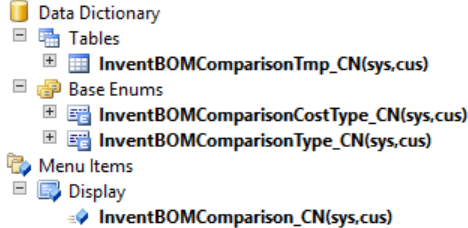
In this case, these four objects need to have the CountryCode property cleared.


Friday, December 15, 2017

Outlook Setup Wizard - Dynamics 365 for Finance and Operations

In Microsoft Dynamics 365 for Finance and Operations, you may want to connect your Office365 email to receive contacts, tasks, and appointments from the ERP.  To do so, navigate to Organization Administration > Setup > Office integration > Microsoft Outlook Setup Wizard.  When it asks for the Exchange Web Services URL use the following to connect to your Office365 email account:
https://smtp.office365.com/EWS/Exchange.asmx


Once that is set up, activities assigned to you in Common > Activities can synchronize with your Outlook client!

Monday, July 3, 2017

Unable to Configure Report for PrecisionForms - Record Already Exists

Symptom:
Cannot create a record in Delivery destinations (BT_DPA_AOT_ReportDestinations). AOT object ID: 13, 2.
The record already exists.


Solution:
The unique index for the BottomLine tables is RecID.  Run the following SQL statement on your AX database.  Replace DATABASE with the name of your AX database.


IF OBJECT_ID('DATABASE.dbo.[BT_DPA_AOT_ReportDestinations]', 'U') IS NOT NULL
BEGIN
       UPDATE SystemSequences
       SET NEXTVAL = 1 + (SELECT MAX(RecID) FROM BT_DPA_AOT_ReportDestinations)
       WHERE TABID = (SELECT [TABLEID] FROM [SQLDICTIONARY] WHERE [Name] = 'BT_DPA_AOT_ReportDestinations' AND [FieldID]=0)
END
IF OBJECT_ID('DATABASE.dbo.[BT_DPA_AOT_Reports]', 'U') IS NOT NULL
BEGIN
       UPDATE SystemSequences
       SET NEXTVAL = 1 + (SELECT MAX(RecID) FROM BT_DPA_AOT_Reports)
       WHERE TABID = (SELECT [TABLEID] FROM [SQLDICTIONARY] WHERE [Name] = 'BT_DPA_AOT_Reports' AND [FieldID]=0)
END
IF OBJECT_ID('DATABASE.dbo.[BT_DPA_AOT_ReportProcesses]', 'U') IS NOT NULL
BEGIN
       UPDATE SystemSequences
       SET NEXTVAL = 1 + (SELECT MAX(RecID) FROM BT_DPA_AOT_ReportProcesses)
       WHERE TABID = (SELECT [TABLEID] FROM [SQLDICTIONARY] WHERE [Name] = 'BT_DPA_AOT_ReportProcesses' AND [FieldID]=0)
END

Friday, June 2, 2017

Export AX Ledger Transactions via SQL

This SQL serves as a starting point to include any number of financial dimensions.

SELECT GENERALJOURNALENTRY.SUBLEDGERVOUCHER as Voucher,
DIMENSIONATTRIBUTEVALUECOMBINATION.DisplayValue as [Account+Dims],
MAINACCOUNT.MainAccountID as [Account],
DIMENSIONATTRIBUTELEVELVALUE.DisplayValue as [Dept],
GENERALJOURNALACCOUNTENTRY.ACCOUNTINGCURRENCYAMOUNT as AmountMST,
GENERALJOURNALACCOUNTENTRY.TRANSACTIONCURRENCYAMOUNT as AmountCur,
GENERALJOURNALACCOUNTENTRY.TRANSACTIONCURRENCYCODE as CurrencyCode
FROM DynamicsAX2012.GENERALJOURNALENTRY
INNER JOIN DynamicsAX2012.GENERALJOURNALACCOUNTENTRY
ON GENERALJOURNALENTRY.RECID = GENERALJOURNALACCOUNTENTRY.GENERALJOURNALENTRY
INNER JOIN DynamicsAX2012.DIMENSIONATTRIBUTEVALUECOMBINATION
ON DIMENSIONATTRIBUTEVALUECOMBINATION.RECID = GENERALJOURNALACCOUNTENTRY.LEDGERDIMENSION
INNER JOIN DynamicsAX2012.DIMENSIONATTRIBUTEVALUEGROUPCOMBINATION
ON DIMENSIONATTRIBUTEVALUEGROUPCOMBINATION.DIMENSIONATTRIBUTEVALUECOMBINATION = DIMENSIONATTRIBUTEVALUECOMBINATION.RECID
INNER JOIN DynamicsAX2012.DIMENSIONATTRIBUTELEVELVALUE
ON DIMENSIONATTRIBUTELEVELVALUE.DIMENSIONATTRIBUTEVALUEGROUP = DIMENSIONATTRIBUTEVALUEGROUPCOMBINATION.DIMENSIONATTRIBUTEVALUEGROUP
and DIMENSIONATTRIBUTELEVELVALUE.DimensionAttributeValue = 5637146881 -- s/b a lookup to DimensionAttribute
INNER JOIN DynamicsAX2012.MAINACCOUNT
ON MAINACCOUNT.RECID = DIMENSIONATTRIBUTEVALUECOMBINATION.MAINACCOUNT
WHERE MAINACCOUNT.MainAccountID LIKE '6%'
 AND DIMENSIONATTRIBUTELEVELVALUE.DISPLAYVALUE = '600'

Thursday, May 18, 2017

Unable to deploy AX2012 Azure Virtual Machine

There is a AX 2012 virtual machine available on the Azure Portal.  When I tried to create one, I received the following error (with typo):

Project was created but there were problems creating deployment instance. You need to be a service administrator or co-administator for the selected Azure subscription or the location selected may not be supported for deploying Microsoft Dynamics AX 2012 R3 instances.


This happens because Azure environment does not trust Lifecycle Services.
  1. Open Lifecycle services to the project you tried to use
  2. Go to Microsoft Azure settings
  3. Download the management certificate
  4. Open the old Azure Management portal.
  5. Go to Settings > Management Certificates
  6. Upload the certificate.
  7. Go back to Lifecycle services and click the plus sign to create an environment and follow the steps.

Wednesday, May 10, 2017

Finding invalid document handling references

static void listDocuHandling_InvalidPaths(Args _args)
{
    DocuRef                 docuRef;
    DocuValue               docuValue;
    SysOperationProgress    progress;
    Common                  common;
    ;
    setPrefix("Invalid document handling file references");

    // Initialize progress indicator
    select count(RecId) from docuRef;
    progress = new SysOperationProgress(1, true);
    progress.setTotal(docuRef.RecId);
    progress.setCaption(funcname());

    while select docuRef
    join docuValue
    where docuValue.RecId == docuRef.ValueRecId
    {
        progress.setText(docuRef.Name);
        common = docuRef.refCommon();
        setPrefix((docuRef.Name) ? int642str(docuRef.RecId) + ' - ' + docuRef.Name : int642str(docuRef.RecId));

        if (!common.RecId)
        {
            error(strfmt("Referenced record %1 in %2 does not exist", docuRef.RefRecId, docuRef.refTablename()));
        }

        // Check if the file exists
        if (docuRef.docuType().FilePlace != DocuFilePlace::Database
         && !WinAPI::fileExists(docuValue.Path + docuValue.fileName()))
        {
            info(docuValue.Path + docuValue.fileName());
            if (common.RecId)
                info(common.caption(), strMin(), SysInfoAction_TableField::newBuffer(common));
        }
        progress.incCount();
    }
    progress.kill();
}

Friday, May 5, 2017

Work item could not be created. Insufficient rights for user

There are 60 workflows available within AX and it can be frustrating to try and set up specific security for each one.  The following message is no exception (pun).

Symptom
Stopped (error): X++ Exception: Work item could not be created. Insufficient rights for user cluther.
 at SysWorkflowWorkItem-create
SysWorkflowWorkItem-createWorkItems
SysWorkflow-save
SysWorkflowQueue-resume
SysWorkflowMessageQueueManager-executeTask
SysWorkflowMessageQueueManager-run

Details
Throws the error from \Classes\SysWorkflowWorkItem.create() line 155

Approach
Add the following warning messages to the SysWorkflowDocument so that AX explicitly tells you what access is required in order to run the workflow.


Tuesday, April 25, 2017

Test Data Transfer Tool - Object reference error

The Test Data Transfer Tool can be invaluable in copying data from one environment to another for testing.  Sometimes you may want to export the data against a restored copy of an environment, either due to security, or to limit any chance of performance degradation during the export.

It is important that you make a copy of both the AX data database as well as the model.  The tool exports table and field ID information from the model database.  If that model database does not exist with the right name, you will get 'object reference not set to an instance of an object' errors in the export log:

C:\Program Files (x86)\Microsoft Dynamics AX 2012 Test Data Transfer Tool (Beta)\DPLog.xml


Saturday, February 18, 2017

List AOSs Supported by SQL Server Instance

I recently found myself in the situation of needing to know what Dynamics AX Application Object Servers (AOS) are online in an environment.  The situation was a bit simplified because all of the AOS were served by the same SQL Server.  So I set out to build a SQL script which would query all of the relevant AX databases, look at the online servers and clients then summarize what it found.  After some tinkering I was able to create the following result:


Here is the query should you want to use it!

Monday, February 13, 2017

Bottomline PrecisionForms: Cannot Send Failed Email Notice

The Bottomline PrecisionForms Email service can send the helpdesk an email whenever an error is encountered.  It is important that you configure this correctly otherwise errors will be shown in the trace log.

BTEmail,No from address available for SMTP, cannot send failed email notice

Steps to correct or configure
1. Open Bottomline PrecisionForms Email
2. Click Administration > Configure email
3. Validate/fill out the "On failures send email to"


4. Click SMTP button
5. Validate/fill out the "Default sender name" to be the email form which errors are sent.


Saturday, February 4, 2017

Workflow Error: Application Cannot Be Started

Recently I was trying to set up a workflow in AX 7 / Dynamics 365 for Operations.  I was unable to open the workflow editor.


After clicking the details button I found the following:
Deployment Identity                : Microsoft.Dynamics.AX.Framework.Workflow.WorkflowEditorHost.application, Version=7.0.4307.16141, Culture=neutral, PublicKeyToken=c3bce3770c238a49, processorArchitecture=amd64
...
System.Deployment.Application.InvalidDeploymentException (Zone) - Deployment and application do not have matching security zones.

The fix in this case was to add AX as a trusted web site in the Internet Explorer Internet Options and to use Internet Explorer instead of Chrome:


I also found there are other common issues with the workflow editor.  If adding AX as a trusted site did not help, you might try looking at the following post:
https://organicax.com/2016/10/19/working-with-the-workflow-editor-download-in-ax7/